OCMaker AI Review: An All-in-One Anime Character Generator That Actually Gets Anime Right
A hands-on look at OCMaker AI, a platform built specifically for anime character creation. We dig into its text-to-image, video animation, 3D modeling tools and whether the specialization pays off.
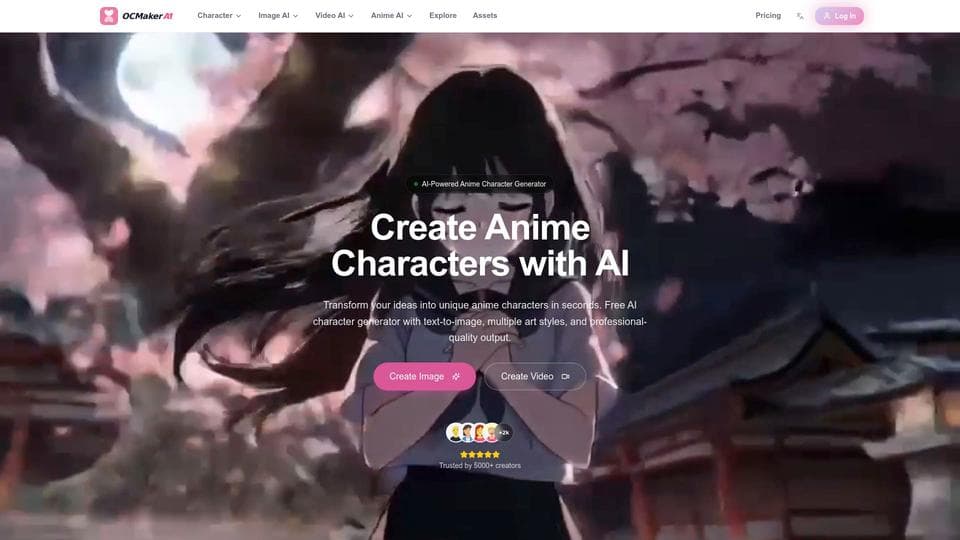
Why Generic AI Tools Keep Getting Anime Wrong
I've been reviewing AI image generators for a while now, and there's one complaint that keeps showing up in every anime creator community I follow: "Why does my AI-generated character look like it was drawn by someone who learned anime from a two-minute YouTube tutorial?"
The problem isn't hard to understand. Tools like Midjourney and DALL-E are trained on everything from oil paintings to product photography. Anime is just one category among thousands. So when you ask for a character with "tsundere expression wearing a seifuku," the model kind of gets it, but the details are off. The pleats on the skirt look wrong. The expression reads more as "confused" than "annoyed but secretly caring." The eyes don't have that specific highlight pattern that makes anime eyes look alive.
This is the gap that OCMaker AI is trying to fill. Not by being another general-purpose generator with an anime filter, but by building the entire platform around anime character workflows from the ground up.
First Impressions: The Interface Tells You What This Is
The first thing you notice when you land on OCMaker is that this isn't a "type a prompt and pray" kind of tool. The interface is organized around specific creation modes, each tailored to a different part of the character creation process.
You've got dedicated sections for Text-to-Image, Image-to-Image, Character Reference (for keeping a character looking the same across multiple images), pose control with skeleton detection, and a whole video generation pipeline. There's even a sketch simplification tool that can clean up rough pencil drawings and turn them into finished line art.
The workflow is straightforward: type your character description, pick an art style, adjust settings, hit generate. Each image takes roughly 30 to 60 seconds. Nothing groundbreaking about the process itself, but the output quality and the level of control you get over character-specific details is where things start to diverge from the general-purpose tools.
The Model Lineup
One thing OCMaker does differently is aggregating multiple AI models under one roof. The platform currently integrates Sora 2, Veo 3.1, Hailuo 02, Seedance Pro, Kling 2.5, Midjourney v6, Stable Diffusion 3, and DALL-E 3.
Why does this matter? Different models have different strengths. Some handle dynamic poses better, others nail facial expressions, and some are stronger with specific art styles like watercolor or cel-shading. Having them all accessible from one interface means you can experiment without bouncing between five different websites and managing five different subscriptions.
In practice, you pick the model that fits what you're trying to create, and OCMaker handles the rest. If you're not sure which model to use, their prompt guides and featured works gallery can point you in the right direction.
Character Features That Actually Matter
Keeping Characters Consistent
Anyone who's tried to create a series of images with the same character using AI knows the pain. You generate a perfect character, love everything about her design, and then the next image gives her a completely different face shape and hair color. It's maddening.
OCMaker's Character Reference system addresses this directly. You can lock in a character's visual identity and generate new images with different poses, outfits, and backgrounds while keeping the same person recognizable. For anyone building a webcomic, running an anime-themed social media account, or developing characters for a visual novel, this is the feature that makes everything else useful.
Pose Control with Skeleton Detection
This is where the specialization really shows. Instead of trying to describe a pose in words (which rarely works well), OCMaker lets you use an advanced skeleton detection system to set up poses visually. You define the body position, and the AI generates the character in that exact pose.
If you've ever spent twenty minutes trying to prompt Midjourney into generating a character in a specific fighting stance or casual sitting pose, you'll appreciate why this exists.
From Still Images to Animation
OCMaker isn't just about static images. The platform has a surprisingly full animation pipeline:
- Image to Video: Take any generated character and animate them into a short clip
- Character Dance: Generate dance animation sequences (this is popular for TikTok and short-form content)
- Live2D AI Video: Create the kind of layered animation that Vtubers use for their avatars
- Video to Video: Transform existing footage into anime style
- AI Kissing / Hugging generators: Niche, but genuinely popular for fan content and social media
The video side uses models like Seedance 2.0, Kling Motion Control, and Wan 2.6, which handle motion more naturally than trying to hack together animation from individual frames.
Line Art and Sketch Tools
Two features that caught my eye: Colorful Line Art and Sketch Simplification. If you're someone who draws rough sketches on paper or an iPad, you can upload those messy drawings and let OCMaker clean them up into polished line art. It won't replace a skilled inker, but for quick concept work or social media posts, it saves a lot of cleanup time.
The Photo to Anime conversion also works well for creators who want to turn real-world references into anime-style assets. Upload a photo of a real location, get back an anime background you can use with your characters.
Comic Generation
OCMaker includes an AI Comic Generator that arranges character images into panel layouts. For webcomic creators who are faster at writing stories than drawing them, this could speed up production significantly. The output won't match a professional manga artist, but for indie webcomics and social media comics, the quality is solid enough to build an audience with.
Pricing Breakdown
The free tier gives you enough credits to test the platform seriously. Beyond that, three paid tiers:
| Plan | Credits/Month | Rough Output | Notable Features |
|---|---|---|---|
| Basic | 150 | ~75 images or ~37 videos | All models, no watermarks |
| Standard | 400 | ~200 images or ~100 videos | 1080P+ output, 100+ video templates, cross-video character consistency |
| Pro | 600 | ~300 images or ~120 videos | 4K output, API access, priority processing, priority support |
All paid plans include commercial use rights, which matters if you're selling prints, running a commercial channel, or using the art in client work. Free tier is personal non-commercial use only.
Credits reset monthly, and you can buy additional credit packs if you burn through your allocation on a big project. Payment goes through Stripe, so the usual credit cards and payment methods are supported.
Where OCMaker Fits in the Landscape
Let me be direct about what OCMaker is and isn't.
It's not going to replace Midjourney if you need photorealistic renders or fine art styles. It won't match Stable Diffusion's flexibility if you want to run custom models locally with full parameter control. And if anime isn't your primary use case, you'll find the specialization limiting rather than helpful.
But if your work revolves around anime and character creation, the depth here is hard to match with general tools. The character consistency system, pose control, animation pipeline, and sketch-to-finished-art workflow are all things you'd normally need three or four separate tools to accomplish. Having them integrated means less context-switching and more time actually creating.
The comparison I keep coming back to is specialized vs. general-purpose cameras. A smartphone camera does everything okay. A dedicated macro lens only does one thing, but it does that one thing at a level the smartphone never will.
A Few Things to Watch Out For
The platform has over 5,000 creators using it, but it's still growing. The community and asset library are smaller than what you'd find on something like Civitai or the Midjourney Discord. If you rely heavily on community prompts and shared resources to guide your work, you might find the ecosystem thinner than expected.
Also, generation speed at 30 to 60 seconds per image is fine for individual pieces but adds up if you're doing batch work. The Pro plan's priority processing helps, but it's worth factoring in if you're planning high-volume production.
Who Should Try This
You should look at OCMaker if you're:
- Building original characters and tired of fighting general-purpose tools to get anime details right
- Running an anime content channel and need consistent character visuals across dozens of posts
- A webcomic creator who writes faster than they draw
- Exploring Vtuber avatar design or Live2D content
- A game developer in the concept art phase who needs quick character visualizations
You probably don't need it if anime is just an occasional thing for you, or if your work is primarily photorealistic or non-illustrated.
Final Take
OCMaker AI made a clear bet: go deep on anime instead of wide across every style. For the audience it's targeting, that bet works. The character tools are more refined than what you get from general generators, the animation pipeline adds real value for content creators, and the multi-model approach means you're not locked into one AI's interpretation of what "anime" looks like.
The free tier gives you enough room to test it properly before committing any money. If anime character creation is a regular part of what you do, it's worth the thirty minutes to see if the output matches your standards.
February 2026